Fill
Reconstruct a painted region from the surrounding image context.
Available locallyPaint the pixels that need work, preview a bounded local result, and accept it in the existing image layer. Varve's verified local providers handle mask-guided Fill and Remove / Generative Subtract in the browser and desktop app. Desktop promptless Expand adds real pixels beyond an image while keeping the original exactly in place; browser Expand is currently gated after a real-photo visual failure. Prompt-conditioned Replace and Expand remain gated until a local model passes compatibility and quality review.
Reconstruct a painted region from the surrounding image context.
Available locallyPaint over an unwanted object or blemish and rebuild the background without deleting the source layer.
Available locallyPrompt-conditioned replacement is wired for desktop, but no reviewed prompt model is shipped. Arbitrary local model import is intentionally unavailable until a model-specific adapter passes Varve's runtime and real-photo qualification.
Desktop qualification requiredAdd pixels beyond the current image bounds on desktop. Choose independent sides, a containing aspect ratio or output size, and a side or corner anchor. The retained source is copied through exactly, the full new border including corners is generated, and the result is reviewed before it replaces the image. Browser Expand remains unavailable until a qualified outpainting provider passes visual review.
Desktop local · reviewed boundaryThe workflow
Open the same workflow from the image inspector, Crop & Bounds, the Layers or canvas context menu, Object → Generative Edit…, or the command palette. Then use a brush, pixel selection, layer mask, image alpha, a Background Removal preview, or a confirmed Object Selection candidate. Select subject is a reviewable foreground estimate; when one person or object is the intended target, use prompted Object Selection or manual paint instead of treating an automatic matte as semantic recognition. If you need an automatic mask before painting, Start Object Selection hands control back to the canvas and you can reopen the edit to import the confirmed candidate. The handoff stays disabled when it would discard an in-progress mask. Black preserves the source; white identifies the region to regenerate.
Draft uses the fast PatchMatch path. Higher quality uses the optional LaMa model; prompt-conditioned desktop modes require a model-specific local diffusion profile that has been validated. Arbitrary checkpoint import is not offered because a file extension cannot prove model/runtime compatibility. For Fill and Remove / Generative Subtract, only the selected source region is decoded, the working raster is capped for the device tier, and the accepted result remains a bounded patch over the source. Expand builds a validated full-frame plan, protects the retained rectangle byte-for-byte, and states the effective resolution of the generated border.
Compare Original and Result, inspect at Fit or 1:1, and keep a generated variation only when it looks right. Object Selection candidates are proposals: confirm the highlighted target in the selection surface and again in the compositing context before pixels can change. Reopen an accepted edit and choose Edit mask to refine it without losing the recipe.
Accepting updates the existing image layer in one undoable transaction while retaining an immutable source snapshot and the mask/provider record.
Reviewed on a real photograph
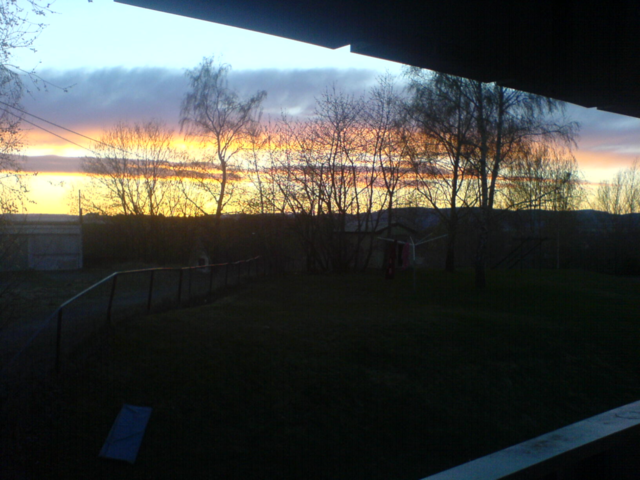
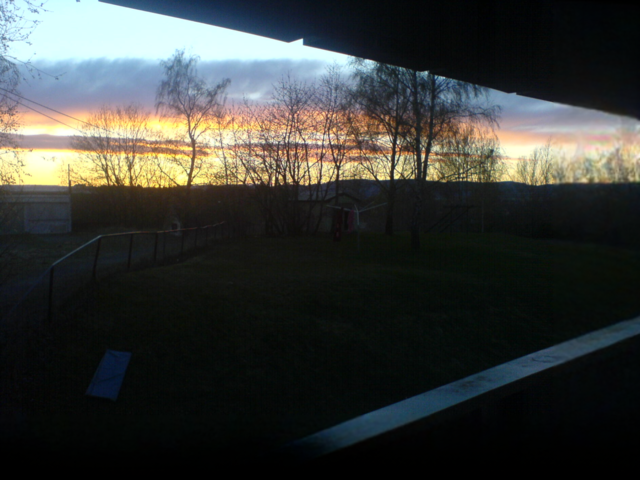
This reviewed desktop example extends the right and bottom edges without moving or rewriting the retained source pixels. The new border is synthesized at a bounded resolution and can be softer than the original, so the result remains subject to review before acceptance. Browser Expand's Fast preview stays unavailable because it did not pass real-photo visual review; an AI-quality browser path using this same LaMa model is implemented but not yet independently verified there. Prompt-conditioned Replace and Expand are not represented here because their local model qualification is still incomplete.
Fixture: “Landscape picture”by Michae2109 · public domain. See the workflow and capability limits for the full qualification boundary.
Qualification status
Varve publishes the verified desktop-local Fill, Remove, and promptless Expand boundary. Promptless Expand was measured on four public-domain photographs: the retained source was byte-identical after composition, generation ran locally in 20 to 60 seconds per image, and the results held for sky, water, grass, studio backdrop, and plain print surround, with a documented architecture limitation. The browser Fast continuation was visually rejected for edge striping and is not offered. The prompt-conditioned model candidates tested on a real photograph did not meet the semantic-quality and runtime-integrity bar, so Replace, prompt-conditioned Fill, and prompt-conditioned Expand remain unavailable. FLUX.1-Fill-dev is a research candidate for a possible future high-memory or hosted-provider qualification lane, not a shipped capability; FLUX.1.1 [pro] is hosted and outside this local workflow. LaMa is not a dedicated outpainting model: the generated border is synthesized at a bounded resolution and detail there is approximate. We do not show an unreviewed before/after as product proof.
Designed to stay in sync
Reuse existing intent.
Start with a brush mask, the current pixel selection, an image layer mask, source alpha, a current Background Removal preview, or a confirmed Object Selection candidate. Expansion, feathering, and bounded context keep the edit aligned to source pixels.
Keep the document honest.
Apply updates the selected image in place, preserves its identity and layout, and retains the original pixels for Restore Original. Provenance, undo, save/reopen, export, and the Layers panel stay on one document state.
Know what is available.
Fill and Remove run locally in the browser and desktop app today. Desktop also exposes promptless Expand within its reviewed photographic boundary. Fast/PatchMatch is the lightweight path for constrained devices, including many Chromebooks and ARM systems; large photographs use a bounded source region and a transparent accepted patch instead of a full inference frame. Desktop Expand copies the retained source through exactly and generates only the new border. Browser Expand's Fast preview, Replace, and prompt-conditioned generation remain gated until a provider passes Varve's compatibility and visual-quality requirements; an AI-quality browser Expand path is implemented but pending that same verification before it is treated as shipped.
